Connectors
About
Connectors are an Engine resources that allow your flow scripts to interact with the outside world - anything and everything outside of the Engine platform. Whenever you want to issue a command to a program, run a script on a remote system, or query a database - all that is performed through connectors.
There are different connector types, each for a particular type of endpoint / protocol.
Connectors are called through the Engine function this.connect(). Each call creates a separate execution of type "connection", with its own inputs and outputs.
Connectors enable outbound communication from Engine. If you want to call Engine from a third party system you can do so with a webhook.
Can't see the video? Watch it on YouTube
Can't see the video? Watch it on YouTube
Usage
There are two ways you can go about using a connector.
The first is to create a connector resource, configure it, and use it in your flow scripts. This is useful if most parameters of your connector are static (e.g. host and port of a database).
The second is to define the connector in your flow script on the fly. This makes sense if the connector parameters change all the time or you're simply testing a connection and you just want to create a disposable connector that you don't intend to reuse.
Creating and using a connector resource
Click on '+ Create' -> 'Connector' -> 'OPENAI'. Call it "my_openai_connector". You can configure the connector attributes in a form or in YAML format. For configuring using the YAML format switch to 'Code view'.
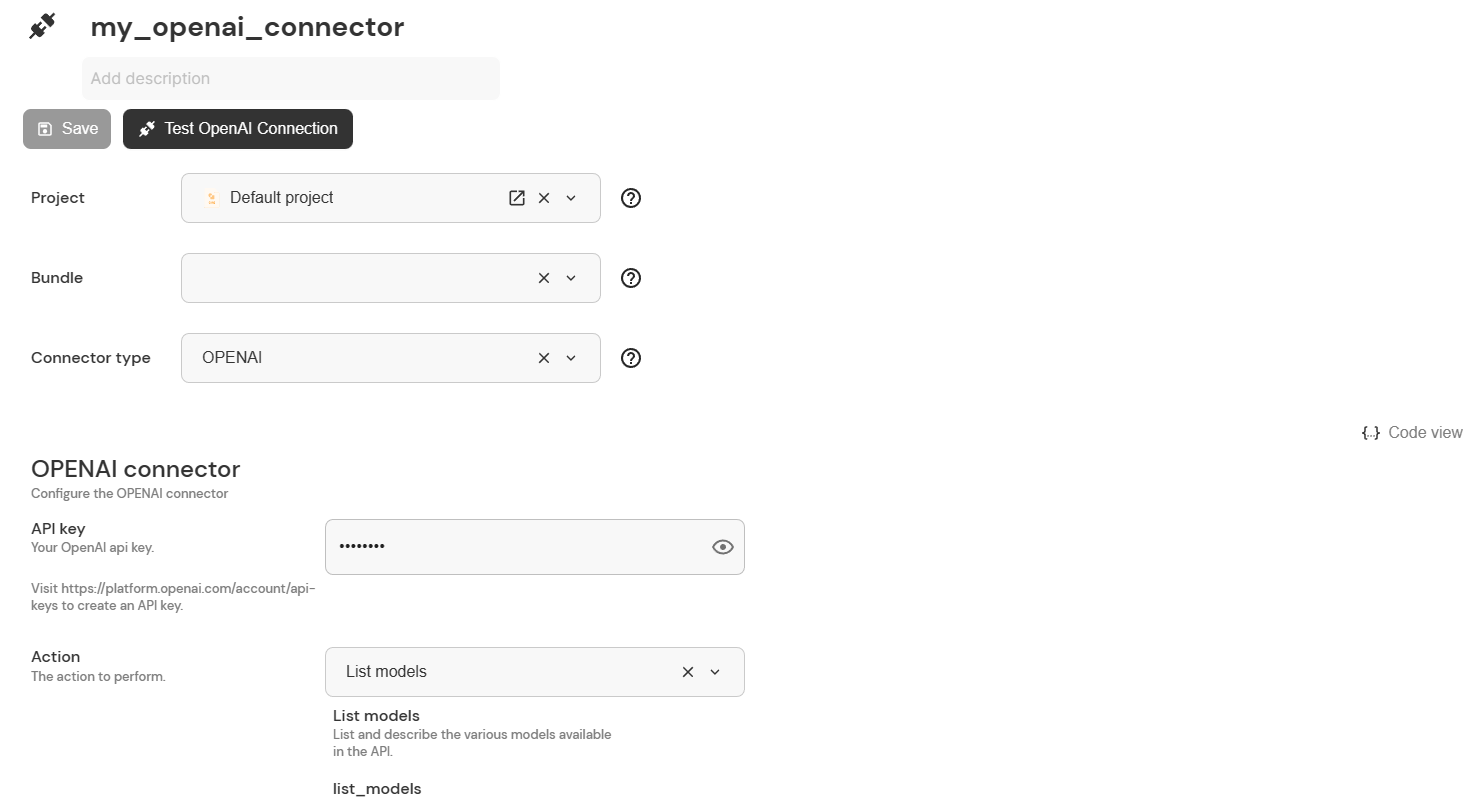
The form for configuring a connector
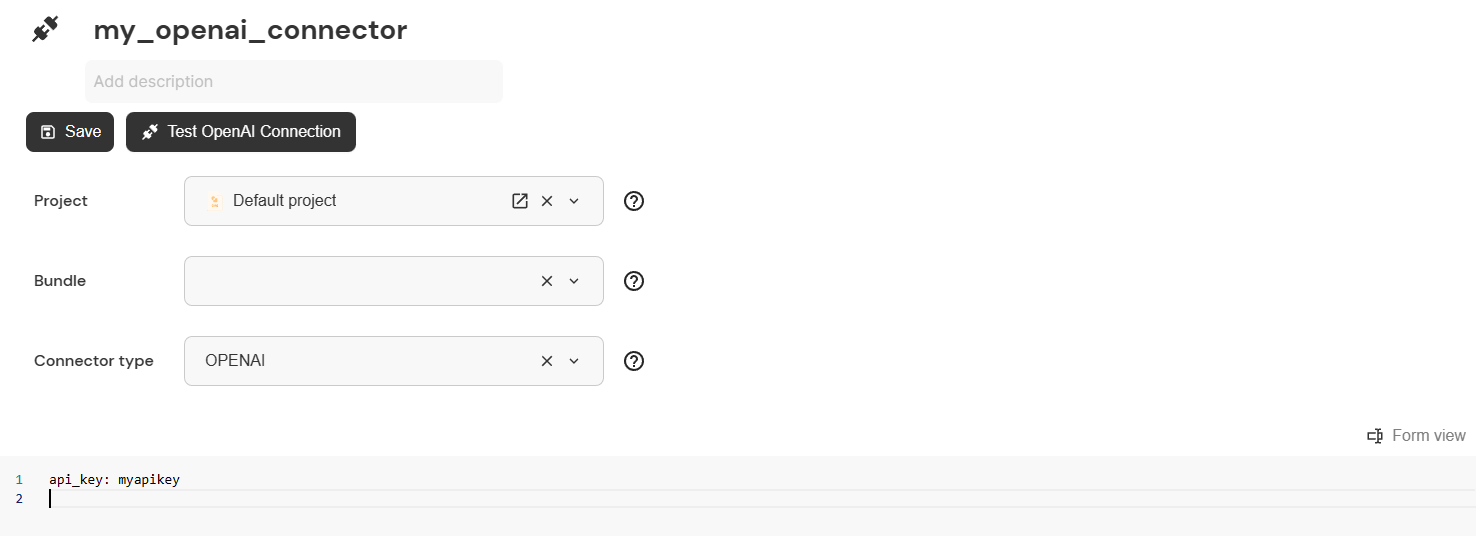
The code view for configuring a connector
The configuration must be a valid YAML document: yaml.org/spec It is also possible to enter a JSON config, since YAML is a superset of JSON. Invalid lines in the configuration (e.g. lines beginning with #) are discarded.
Here's how you can use this newly created and configured connector in a flow script. Note that the first parameter of this.connect() is the name of the connector.
import flow_api
def handler(system: flow_api.System, this: flow_api.Execution, inputs: dict):
    models = this.connect('my_openai_connector').get('output_value')
    this.log(models)
    return this.success('all done')
Overriding inputs
You can override inputs which are stored in the connector by specifying different values when using the connector. Let's modify the flow script from before to use a different API key.
import flow_api
def handler(system: flow_api.System, this: flow_api.Execution, inputs: dict):
    models = this.connect('my_openai_connector', api_key='anotherapikey').get('output_value')
    this.log(models)
    return this.success('all done')
When you override a key in the input value that is a YAML object (or Python dictionary), the old value will be merged (and not replaced) with the new value. This can result in an invalid configuration.
-
Overriding a key that is not an object. This works fine:
# connector config of `my_connector`
my_key: 1
# flow script
this.connect('my_connector', my_key=2)# resulting config of the connection execution
my_key: 2 -
Overriding a key that is an object. This results in a merged object, that leads to an error, since the connector does not expect the
temp_pathkey with the mode_namerun_commands.# connector config of `my_connector`
mode:
mode_name: execute_script
temp_path: /tmp# flow script
this.connect('my_connector', mode={
'mode_name': 'run_commands',
'script': 'uptime',
})# resulting config of the connection execution
mode:
mode_name: run_commands
temp_path: /tmp
script: uptime
To avoid this, only define keys in a connector that are valid accross all modes that you will use, and define the rest in the flow script. You can also create multiple connectors for different modes, and use the appropriate connector in the flow script.
Defining connectors within flow scripts
If you don't want to use a connector resource, you can define the connector parameters in the flow script. Note, that you need to specify connector_type as well (if an existing connector resource is used, this parameter is already supplied).
import flow_api
def handler(system: flow_api.System, this: flow_api.Execution, inputs: dict):
    inputs = {
        'url': 'https://httpbin.org/post',
        'method': 'post',
        'data': 'payload',
    }
    child_execution = this.connect(connector_type='REST', **inputs, run=False)
    child_execution.run_async()
    # do other stuff
    child_execution.wait()
    outputs = child_execution.get('output_value')
    this.log(outputs)
    return this.success('all done')
Typed connector methods
this.connect() works for every connector type, but because it takes a single generic set of keyword arguments, the code editor cannot know which fields a particular connector type expects and therefore cannot offer completions for them. To get field completions and inline documentation while you write a flow, every connector type also has its own dedicated method: this.connect_<type>().
For example, instead of the generic call:
child = this.connect(
    connector_type='SQLPG',
    host='db.example.com',
    mode={'mode_name': 'fetch', 'query': 'SELECT 1'},
)
you can write:
child = this.connect_sqlpg(
    host='db.example.com',
    mode=flow_api.SqlpgModeFetch(query='SELECT 1'),
)
Both calls are equivalent at runtime — this.connect_sqlpg(...) simply forwards to this.connect(connector_type='SQLPG', ...). The difference is that the typed method carries the connector's top-level input fields (host, mode, authentication, port, ...) as real keyword arguments, so as soon as you type this.connect_sqlpg( the editor suggests them with the right types.
There is one method per connector type, named after the type in lower case — for example this.connect_ssh(), this.connect_http(), this.connect_sqlpg(), this.connect_smtp(), this.connect_k8s(), this.connect_aws(), and so on. this.connect_http() is the method for the HTTP/REST connector; this.connect_rest() is available under the REST name as well.
Typed input helper classes
Many connector fields are "one of several shapes". An SSH connection's mode, for instance, can be execute a script, run commands, or forward a port, each with its own fields; the shape is selected by a discriminator field (mode_name, authentication_method, scheme, ...). Writing these as raw dictionaries is easy to get wrong. Each such shape has a typed helper class, exposed on flow_api and named <ConnectorType><Field><Variant>:
# raw dict — still fully supported
this.connect_ssh(host='server', mode={'mode_name': 'execute_script', 'script': 'uptime'})

# typed helper — the editor completes the variant's fields,
# and the discriminator is filled in for you
this.connect_ssh(host='server', mode=flow_api.SshModeExecuteScript(script='uptime'))
flow_api.SshModeExecuteScript(script='uptime') is exactly the dictionary {'mode_name': 'execute_script', 'script': 'uptime'}. The helper is a dict subclass, so it is fully interchangeable with the raw dict form and is validated identically. A few more examples:
flow_api.RestModeGet()                # {'mode_name': 'get'}
flow_api.RestSchemeHttps()            # {'scheme': 'https'}
flow_api.SqlpgModeExecute()           # {'mode_name': 'execute'}
flow_api.SshAuthenticationUsernamePassword(username='u', password='p')
# -> {'authentication_method': 'username_password', 'username': 'u', 'password': 'p'}
The typed methods and helper classes are additive. The generic this.connect(connector_type=..., **kwargs) and raw dictionaries keep working unchanged — every typed argument also accepts a plain dict, so you can use whichever form you prefer and even mix them within a single call.
Because a typed helper is just a dict, you can use it anywhere a connector input value is expected — for example inside a connector resource's configuration, or in the mode you override when calling a stored connector — not only in the typed connect_<type>() methods.
Attach Vault Secrets
To be able to attach secrets to a connector, a working vault integration must be configured beforehand.
Please refer to Vault Integration for details.
Order of Input Application
Inputs for a connection execution can be specified in different places. Inputs from all places are merged into one combined input set before being used by the connector. Inputs are applied in the following order:
- Value of the connector
- Vault secrets associated with the connector
- Inputs specified in the flow script
Inputs which are applied later can override keys of inputs which were applied before. If, for example, the connector specifies a key port and the vault secret also contains a key port, the value of the vault secret will be used.
Analysing and testing connections
You can extend the functionality of your connectors by downloading the freely available Connection Analysis & Test bundle. With this bundle you can, for example, get the schema of a database or test the connection to an FTP server by simply clicking on a button in the UI of your connector.